
Harvest Weight Capture
UX Designer @ IUNU
IUNU is an agriculture technology startup leveraging artificial intelligence, computer vision, and data to empower greenhouse businesses to grow sustainably and profitably.
What is Harvest Weight Capature?
Harvest Weight Capture (HWC) is one of the features of the LUNA Kiosk compliance application. This feature is created to simplify the recording process of harvest metrics help greenhouse growers grow crops sustainably, and increase the accuracy of field forecasts.
Problem
Recording harvested crop weights with paper and pen in a wet environment and then converting that data into an Excel sheet can be hectic and frustrating due to time-consuming and repetitive work. Recording inaccurate harvest metrics may affect the next planting or result in obsolete inventories.
Simplifies the process of recording harvested crops and builds suitability in crop planning
Before joining IUNU, a user flow was assembled for the harvest weight capture feature. However, I was asked to re-think the entire user flow and redesign some user interfaces to help greenhouse growers navigate the application easily.
Traditionally, non-IUNU customers record harvested crops on a whiteboard or pen and paper. Then convert all the data they recorded into Excel sheets at the end of the day to ensure they don’t lose the data. IUNU customers share what they recorded on paper with our customer success team for them to manually enter the data into an Excel sheet, which is not sustainable as we attract more customers. To maximize the value the harvest weight capture feature can provide and allow our customer success team to focus on more important things, I watched a greenhouse video recorded by our team to understand the process, from preparing the harvests to weighing and recording the weights.

Old user flow
The old user flow needed some steps and needed to be clearer on what some of the buttons do, which could confuse growers to achieve simple tasks. I decided to add and redesign the following screens/user interface:
-
Increase text size for better readability.
-
Change the color of the text for better readability.
-
Redesign the navigation system.
-
Provide alternative solutions when growers can’t use the primary method of optical character recognition to scan weights and attribute them to an inventory group.
-
Provide feedback and confirmation to help growers understand the status of the harvest groups they just worked on.
-
Redesign the crop cards and determine what information should be displayed and hidden.
Start with Navigation Exploration
LUNA Kiosk is a compliance application with three modes: Harvest, Tag, and Inventory lookup. Harvest mode is the first feature I worked on. I worked on the navigation system before diving into the user flow for recording harvest weight because it is important to figure out how growers can navigate in the active mode and switch to another mode. I proposed three variations based on the existing branding guideline and the founder of IUNU’s request for designing for power users by using a floating action button.
I suggested option two, using a top nav bar and a floating action button, because it is clear to growers which mode is currently active and uses the floating action button for the primacy actions they can make from the current mode. However, we ended up moving forward with option one due to wanting to add more screen real estate. Additionally, the founder wanted the floating action button to serve multiple purposes achieved by different mobile gestures. I predicted it would eventually cause usability problems due to unfamiliar mobile gesture patterns and how our target users are not tech-savvy.

Redesigning Harvest Mode
After Harvest V1 was released, we conducted multiple rounds of user testing at the greenhouse, observing how growers used Harvest to attribute weights to each harvest group. We found the following insights:
-
Growers were having trouble using the floating action button to work on the next harvest group
-
The app introduced some learning curve to remember what each mobile gesture can achieve
-
The snackbar was too subtle for growers to notice the feedback due to the little time spent looking at the screen
-
The mobile screen was too small for growers to tap on when wearing gloves
-
Some greenhouses list all the inventory groups that must be worked on for the day, whereas others work on the harvest groups without planning.
-
Depending on the user type, a grower may want to look at the harvest list by the most recent group they worked on to ensure they didn’t miss a group, whereas a head grower or manager may want to look at the type of crops that were being worked on of the day.
Before we launched Harvest V2, I worked with another designer to revamp our design system and branding due to acquiring Artemis and ensuring the branding was unified. Through multiple iterations based on user feedback, the final result of Harvest V2 reduced the number of actions users can make from the floating action button and added flexibility on how growers can work on the harvest groups. It ensured we were designing for more than one customer.

Onboard growers
Educate growers on navigating the experience and four different ways to attribute weight to a new harvest group.

Minimize the manual work required to record harvest weights
The customers who work with us have area cams installed at the greenhouse that monitors the workplace and detects April Tags when growers are weighing harvested crops. Each April Tag has a unique locator number and information about a harvested group, including its crop cycle timeline, available inventory groups ready to sell, and different weight types.
Based on the onsite research at the greenhouse, we found out that scanning weight by OCR isn’t the most preferred method by all growers considering the recording process differs with each greenhouse. Thus, I added two more alternative ways to scan weight based on what we observed: using a USB port to connect the scale and the device (mobile or tablet) or manually input weight.
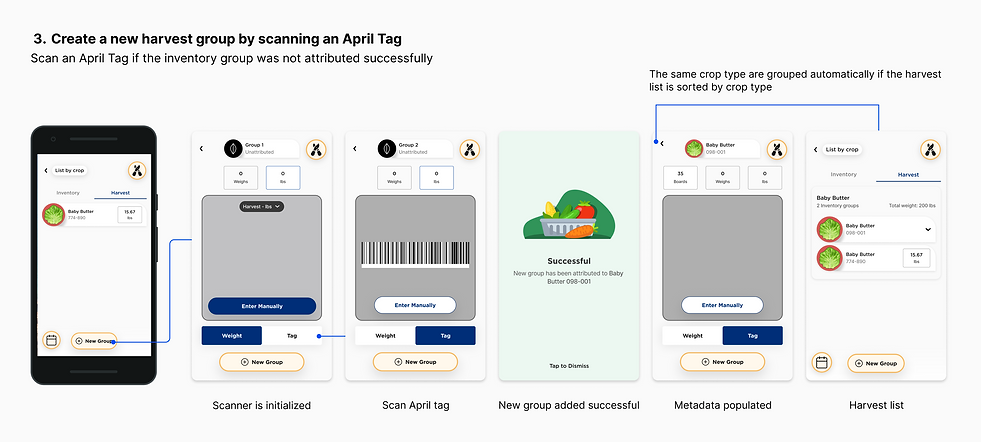
Area cam failed to detect an April Tag
No metadata is displayed on the crop card when an inventory group is not attributed successfully. Growers can grab an April Tag from the last board of the harvest to scan to attribute and register the new harvest group.

Create new harvest groups with your greenhouse map
Although the current Attribute by Location functionality usage is low for creating a new group, we want to unify the experience with our flagship product IUNU where growers can track and flag problems within a greenhouse in real time, allowing them to create new groups using the map.

Tailor your harvest recording process based on how your greenhouse operates
From our onsite research findings, we noticed that we were only designing an experience for greenhouses that don’t prepare a list of inventory groups to work on for their growers. As a result, those that record harvested crops based on a to-do list did not know where to start when interacting with our product.

Missed some harvested groups you worked on into LUNA Kiosk?
The time travel functionality allows you to add new groups in the past to help you log any harvested groups you missed on that day into the system.
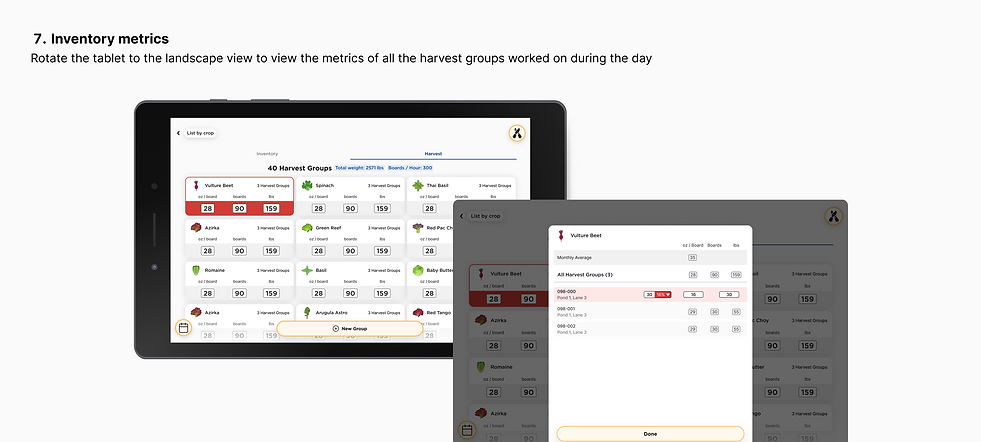
Track the total weights of all crops and the average number of boards of harvest worked on per hour
Based on the onsite research at the greenhouse, we see an opportunity to increase the value we can provide to our customers. The head growers communicated there are times when they wanted to look at how much crop was harvested during the current month, compared to how much they normally produce on average monthly. This way, they can determine their performance from the sales perspective.
We also found that mobile may not be the most useful device to scan weight, but it is only useful when the head growers want to look at what the growers worked on remotely. Thus, we offer a Samsung Galaxy tablet to increase usability and allow growers to mount it on the wall while scanning weights. Since the tablet has more screen real estate, I proposed to allow growers to view the inventory metrics when the tablet is rotated horizontally and alert growers when there is an increase or decrease in yields to help them to make informed decisions for the next planting.